Zviewer

Zviewer

★ 0.0 · FREE · Windows OS

Capturas de pantalla
  • Screenshot 1 screenshot 1
  • Screenshot 2 screenshot 2
  • Screenshot 3 screenshot 3
  • Screenshot 4 screenshot 4
  • Screenshot 5 screenshot 5
  • Screenshot 6 screenshot 6

Detalles de la aplicación

Versión
0.8.5.5201
Tamaño
21.23 MB
Actualizado
January 31, 2023
Requiere
Windows XP
Idioma
English
Licencia
Free
Desarrollador
Zeevee
Categoría
Windows OS

SoftPas en:

Este producto también está disponible en los siguientes idiomas:

Acerca de Zviewer

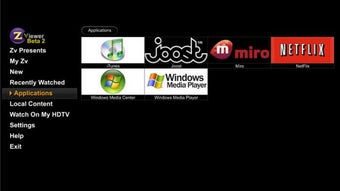
Firefox based media center Do you use the internet to watch video content a lot? Zviewer is a Firefox based media browser that aims to be your center for web based watching. Once installed, you're presented with a range of US TV and internet channels, which when clicked open a menu showing that channel's content. The selection is apparently fixed - you cannot add or remove channels to this page. Most of the channels are only viewable in the US, which Zviewer does not warn you about, so beware wasted moments if you think you can watch The Simpsons outside America! These menu screens are very attractive, and hovering over buttons gives a really satisfying muted click. Unfortunately, one you've selected a show, you are simply taken to the host site to watch the content, it's not actually imported into the slick Zviewer interface. Similarly, if you want to add an Internet video content site, it's as easy as adding a bookmark in any browser, but it will not be included in the Zviewer front page, and clicking merely takes you to the site. Zviewer also supports many Windows remote controls, so if you have your PC hooked up to the TV, you can browse from a distance. This Beta 2 version still has some development needed to make it more than a pretty video bookmarking browser. If you like the channels included, and spend a lot of time just watching video on the web, this is an attractive way to do it. To become the media center it appears to want to be, Zviewer needs better integration with web video content. Changes Critical bug fix, we recommend everyone upgrade to this release. Support for Mac OS X 10.4 (Tiger) on Intel-based machines Support for Firefox 3.5 Bug fixes for Mac graphics drivers that were crashing on certain thumbnails. Support for Mac OS X 10.5 (Leopard) on Intel-based machines Ability for users and content owners to add content to Zinc themselves Media RSS documentation for developers to create content that can be added and optimized in Zinc An example of an HTML page that anyone can create that provides more media choices for Zin

Guías y tutoriales

Cómo instalar Zviewer
  1. Haz clic en el botón Descargar de arriba.
  2. Cuando se te redirija, acepta los términos y haz clic en Instalar.
  3. Espera a que la descarga de Zviewer termine en tu dispositivo.
Cómo usar Zviewer

Este software se usa principalmente para las funciones principales descritas arriba. Abre la aplicación después de instalarla para explorar sus capacidades.

Reseñas de usuarios

Aún no hay reseñas. Sé el primero en compartir tu experiencia.

También te puede gustar

más





